All integrations

Conviro for Magento 2 · Free extension · Version 1.4.1

The AI chatbot for Magento 2 that answers from your live store data

Conviro for Magento is a free Magento 2 extension that connects your store to Conviro's AI assistant. Shoppers get answers on price, stock, order status and tracking, read from your store during the conversation — and you decide what the AI may do.

Free extension. Connecting a store needs a Conviro plan with API access (Pro or higher). Documentation

  • Magento 2.4.4 and later
  • Luma and Hyvä
  • OAuth 1.0a, least privilege
  • Minimal personal data

Your Magento store

● Online

Do you have the Ridge trail shoe in size 42?

Yes, the Ridge trail shoe is in stock in size 42 — 7 pairs left, at €89.00.

Live data

And where is my order #100000482?

I can check that for you. Please tell me the e-mail address you used at checkout.

Illustration. Price and stock are read from your store when the shopper asks, in their store view and currency; order details only after the order number and checkout e-mail match.

Conviro for Magento at a glance

The key facts in one place, as stated in the extension's documentation.

What it is
A Magento 2 extension that connects a Magento store to Conviro, an AI customer-communication platform for web chat, WhatsApp and Instagram.
Package
Composer package conviro/module-aichat (Magento module Conviro_AiChat), current version 1.4.1.
Price
The extension is free. The Conviro service it connects to is a subscription; connecting a store needs a plan with API access, Pro (€109/month) or higher.
Compatibility
Magento Open Source 2.4.4 or later, PHP 7.4 or 8.1–8.4. Install-tested on 2.4.4-p13, 2.4.7-p4 and 2.4.9, with Luma and with Hyvä 1.5.2.
Setup
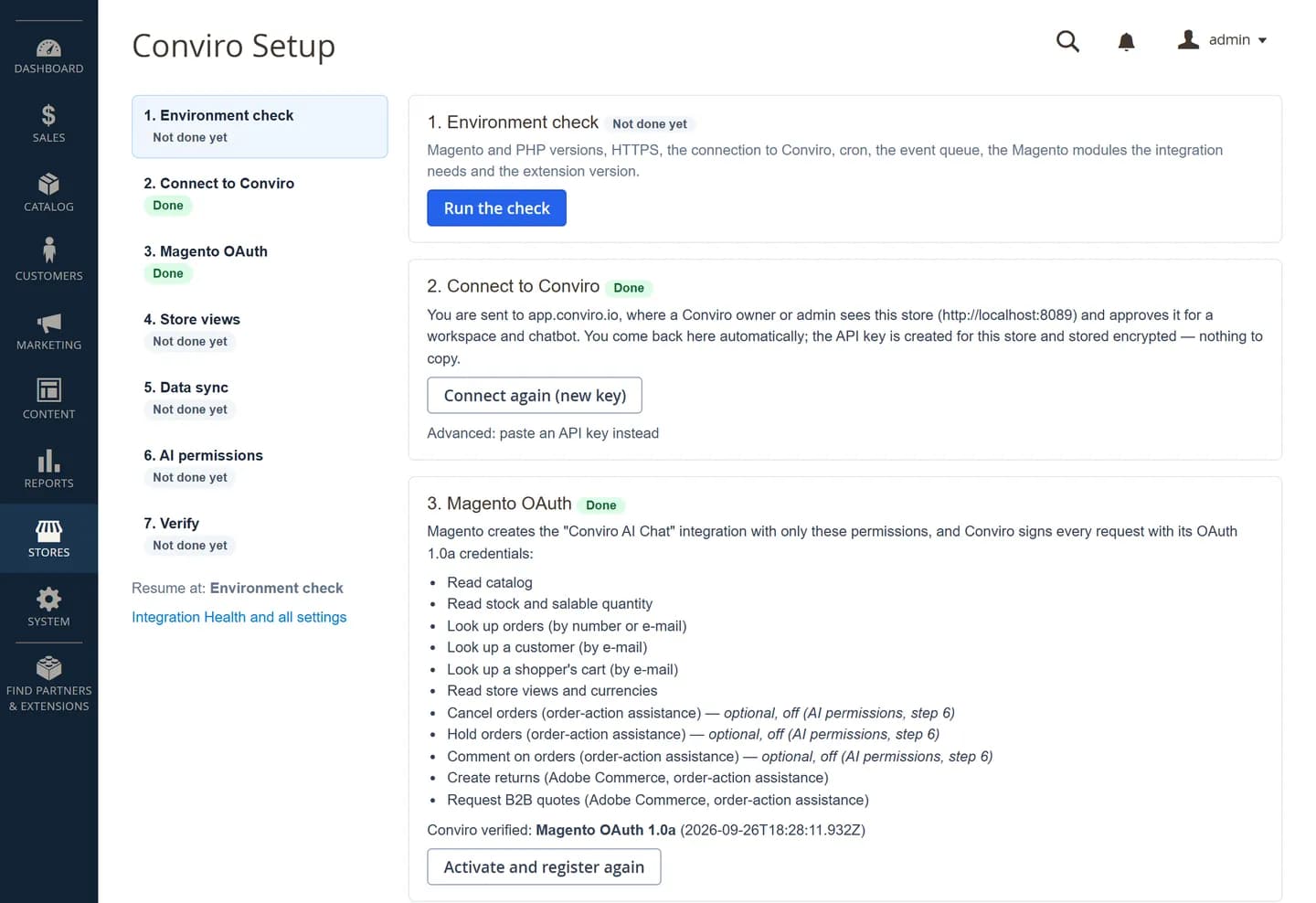
Composer install from repo.conviro.io, then a seven-step setup wizard in the Magento admin that connects the store through your browser — no API key to copy.
What it reads
Products, prices and stock (MSI salable quantity) live from your store; order status and tracking only after the shopper gives the order number and the checkout e-mail.
What it can change
Nothing by default. Cancelling, holding or commenting on an order runs only if you switch it on — by default the customer confirms and your team approves.
Personal data
Order and customer history is stored without names, addresses or phone numbers; e-mails only as a keyed one-way hash.

From Composer to live answers in three steps

  1. 1

    Install the extension

    Add Conviro's Composer repository, run composer require conviro/module-aichat and the usual bin/magento commands. Installing makes no call to Conviro.

  2. 2

    Connect in the setup wizard

    Open Stores › Settings › Conviro Setup and click Connect to Conviro. Approve the store in your Conviro dashboard and your browser takes you back — the wizard then sets up a least-privilege Magento integration (OAuth 1.0a) for you.

  3. 3

    Choose what to share, then go live

    Pick the store views, what to sync (catalog, stock and the last 90 days of orders by default) and what the AI may do. Verify sends a test event through the real delivery path, and the chat widget goes live on your storefront.

The Conviro setup wizard in the Magento admin with its seven steps and the environment check
The setup wizard in the Magento admin (Stores › Settings › Conviro Setup). Screenshot from our Magento 2.4.7 test store.

What your shoppers get — and what your team keeps control of

Every answer about a price, a stock level or an order is backed by your store, not by a guess.

Answers from live price and stock

Price and availability are read from Magento during the conversation, in the shopper's store view, currency and language — MSI salable quantity and configurable variants included. A reply that quotes a price your store did not return is blocked.

Order status and tracking, verified

"Where is my order?" is answered from the live order and its tracking, only after the shopper gives the order number and the checkout e-mail. After five wrong pairs in an hour, lookups pause.

Abandoned-cart recovery

Switch it on and confirm it, and Conviro sends a recovery e-mail in the shopper's language that links back to your own cart page. After a failed payment, the chat offers help once. Both stay off until you confirm.

Hyvä-ready, Luma too

Tested on the Hyvä default theme 1.5.2 (Magento 2.4.9) and on Luma. The widget loads asynchronously in the browser and keeps customer data out of full-page-cached HTML.

Human approval for order actions

Every AI order action is off until you switch it on. Then, by default, the customer confirms with a one-time code sent to the order's e-mail address and your team approves or rejects it — all in an audit log.

Revenue influenced, stated honestly

See the revenue influenced by conversations, product links and recovered carts, per currency — labelled "influenced", never "caused" — in your Conviro dashboard and on a card in the Magento admin. Attribution cookies need consent.

Checkout never waits on Conviro

Checkout, registration and product saves only write a row to a local queue; Magento cron delivers the events in the background, with retries. With Conviro unreachable, orders are still placed normally.

Integration Health at a glance

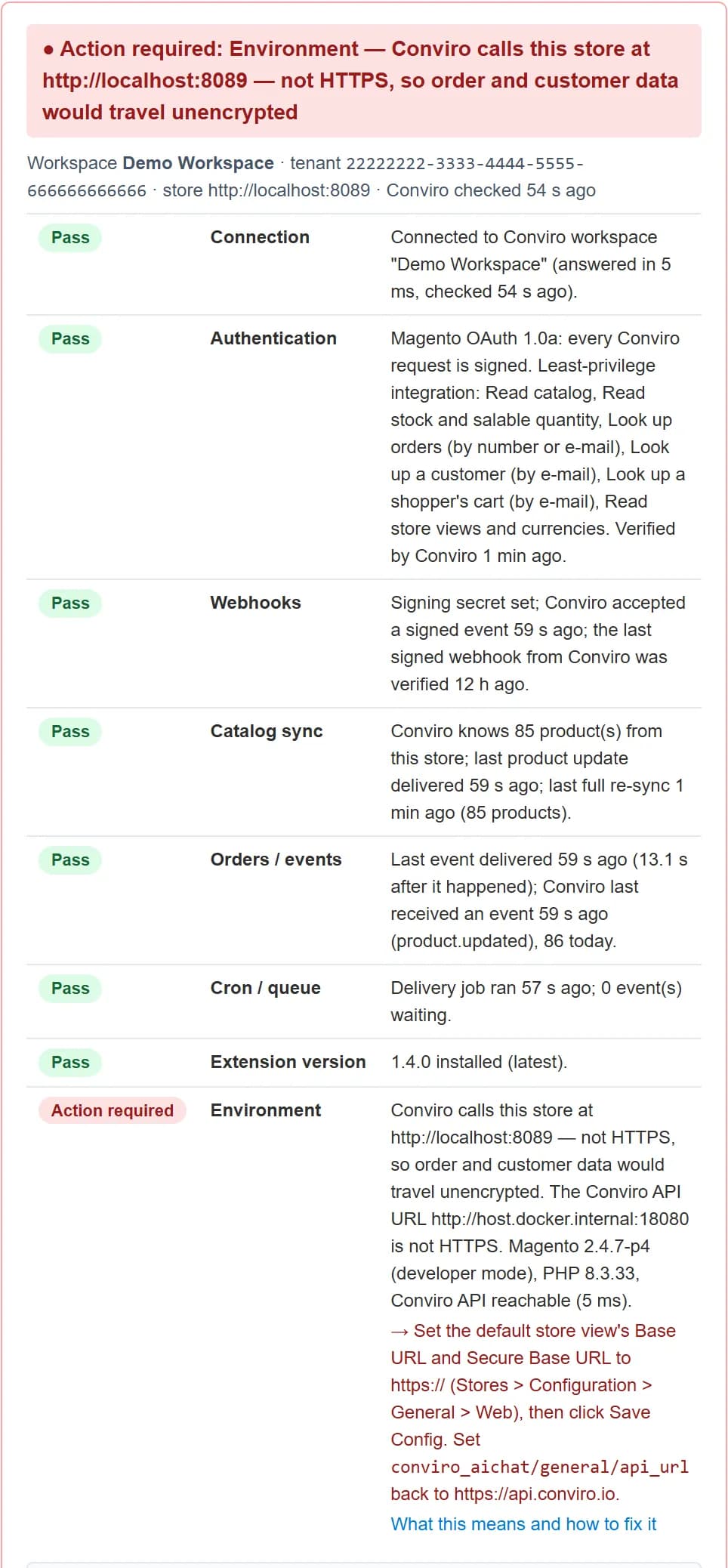
A card in the Magento admin checks the connection, authentication, webhooks, catalog, orders, cron, version and environment — and says exactly what to do when something needs action.

See what works — and what to fix

The Integration Health card sits at the top of Stores › Configuration › Conviro › AI Chat. Every row is a live check with a plain-language fix and a link to the matching page of the documentation.

Integration Health
The Integration Health card in the Magento admin, listing each check with its status
Integration Health in the Magento admin. Screenshot from our Magento 2.4.7 test store, which runs on plain http — hence the one “Action required” row.

Free extension, paid subscription

The Conviro for Magento extension costs nothing to download, install or update. What you pay for is the Conviro subscription behind it: the AI assistant, the inbox where your team takes over conversations, and the web chat, WhatsApp and Instagram channels.

Connecting a Magento store needs a plan that includes API access: Pro or higher. You can create a free account first and upgrade when you connect your store.

Compare all plans

Pro

Most popular

€109/month

€89/month billed annually

10,000 messages per month

Growth

€249/month

€199/month billed annually

50,000 messages per month

Enterprise: custom pricing for larger teams.

Compatibility

What version 1.4.1 was actually tested on — not just what Composer will install.

Compatibility
MagentoPHPStorefrontStatus
2.4.98.4Luma, Hyvä 1.5.2Install-tested (fresh install and upgrade)
2.4.7-p48.3LumaInstall-tested (fresh install and upgrade)
2.4.4-p138.1LumaInstall-tested (fresh install and upgrade)
2.4.6-p15 · 2.4.8-p5——Statically verified, not install-tested

Also good to know

  • PHP 7.4 and 8.2 are declared and pass lint and unit tests; no Magento install has run on them yet.
  • Adobe Commerce uses the same Magento framework (2.4.4 and later) but has not been tested yet. Its returns (RMA) and B2B quotes are used where available, untested.
  • Hyvä Checkout is a licensed product and has not been tested; the extension ships a layout handle for it.
  • On Magento 2.4.0–2.4.3, Composer keeps version 1.3.5.
Source: Supported versions, in the extension documentation

Install with Composer

Run these from your Magento root. The Composer username is the word “api”; the password is your Conviro API key (Developers › API Keys in your Conviro dashboard).

bash
composer config repositories.conviro composer https://repo.conviro.io
composer config http-basic.repo.conviro.io api <YOUR_CONVIRO_API_KEY>
composer require conviro/module-aichat
bin/magento module:enable Conviro_AiChat
bin/magento setup:upgrade
bin/magento setup:di:compile                  # production mode
bin/magento setup:static-content:deploy -f    # production mode
bin/magento cache:flush

Lines marked “production mode” are needed only in production mode; in developer mode, setup:upgrade and cache:flush are enough.

Also needed: an https store URL, Magento cron running (bin/magento cron:install) and outbound HTTPS to api.conviro.io.

Least privilege by design

Conviro reads what it needs to answer — and cannot change your catalog, prices or orders unless you allow it.

  • Magento's own OAuth 1.0a: every request Conviro makes to your store is signed.
  • The integration holds only the extension's read API, with no core Magento write access. Lookups must be narrowed to one order or one e-mail address, and page sizes are capped.
  • Order actions (cancel, hold, comment) are granted to the integration only while you have order-action assistance switched on.
  • The connect flow creates an API key for this store only: limited to the extension's routes and one chatbot, bound to your store URL, and stored encrypted in Magento.
  • Webhooks are signed in both directions (HMAC-SHA256, five-minute window) and replays are ignored.
  • Customer deletions in Magento reach Conviro; order history is kept for a rolling 24 months and deleted 30 days after you disconnect, or at once if you choose.
Permissions explained

Frequently asked questions

How much does Conviro for Magento cost?

The extension is free to download, install and update. The Conviro service it connects to is a subscription: connecting a Magento store needs a plan with API access, Pro at €109/month (€89/month billed annually) or Growth at €249/month; Enterprise is priced on request. The pricing page lists every limit.

Which Magento and PHP versions are supported?

Magento Open Source 2.4.4 or later, on PHP 7.4 or 8.1–8.4. Version 1.4.1 was install-tested on 2.4.4-p13 (PHP 8.1), 2.4.7-p4 (PHP 8.3) and 2.4.9 (PHP 8.4); 2.4.6-p15 and 2.4.8-p5 were verified statically. Stores on 2.4.0–2.4.3 stay on version 1.3.5.

Does it work with Hyvä?

Yes. Version 1.4.1 was tested on the Hyvä default theme 1.5.2 on Magento 2.4.9 with the Luma checkout fallback, including full-page-cache privacy and cookie consent. Hyvä Checkout is a licensed product and has not been tested; the extension ships a layout handle for it.

Does it work with Adobe Commerce?

The extension declares the same Magento framework (2.4.4 and later) that Adobe Commerce is built on, but it has not been tested on Adobe Commerce yet. Adobe Commerce returns (RMA) and B2B quotes are used where the installation provides them and are untested; without them, those requests become tasks for your team.

Do I have to copy API keys or tokens into Magento?

No. The setup wizard connects through your browser: you click Connect to Conviro, approve the store in your Conviro dashboard and return to Magento, which then receives its credentials server to server. The only key you handle is the Conviro API key you use as your Composer password.

What store data does Conviro receive, and how is GDPR handled?

Catalog and stock changes, new orders and, by default, the last 90 days of order history, plus customer accounts only if you choose — all limited to the store views you select. Orders and customers are stored without names, addresses or phone numbers, e-mails only as a keyed one-way hash. New registrations become leads with name and e-mail unless you switch that off. Customer deletions reach Conviro, cart recovery stays off until you confirm it, and attribution cookies need the shopper's consent.

Will it slow down my store?

Storefront pages never call Conviro from PHP, and the chat widget loads asynchronously in the browser. Checkout, registration and product saves only write a row to a local queue, which took a few milliseconds in our tests; Magento cron delivers the events in the background. With Conviro unreachable, orders are still placed normally.

Can the AI cancel orders on its own?

No. Every order action is off by default. When you switch one on, by default the customer confirms it with a one-time code sent to the order's e-mail address and your team approves or rejects it, and each step is recorded in an audit log. Changes Magento has no API for, such as a new delivery address, become tasks for your team.

Does it support multiple store views?

Yes. In the setup wizard you choose which store views Conviro may see. Answers use the shopper's store view, currency and language, and for store views you leave out no customer, order or cart data is sent.

How do I uninstall it?

Disconnect first in Stores › Settings › Conviro Setup: that revokes the key the connect flow created and, by default, removes the chat widget from your storefront. Then disable the module, run composer remove conviro/module-aichat and setup:upgrade. Store data at Conviro is deleted 30 days after the disconnect, or at once if you choose.
Give your Magento shoppers answers they can trust

Install the free extension, connect your store in the setup wizard and let Conviro answer from your live catalog and orders — while order actions stay off until you allow them.